
Context-Driven Development Meets Team Agents: What Changed and What Didn't
How a Claude Code plugin evolved from custom orchestration to Team Agents — and why context files matter more than prompts

Six months ago, I started building a plugin for Claude Code that fused two ideas into one workflow.
The first idea: spec-driven development — a structured pipeline where you write a requirements doc, create an implementation plan, and then build. Think of it as blueprints before construction. You wouldn’t renovate a kitchen by just telling a contractor, “Make it nice”. You’d draw up plans, pick materials, and agree on the timeline. Specs do the same thing for code. They work especially well for complex features — the kind that touch multiple files across different layers of your application.
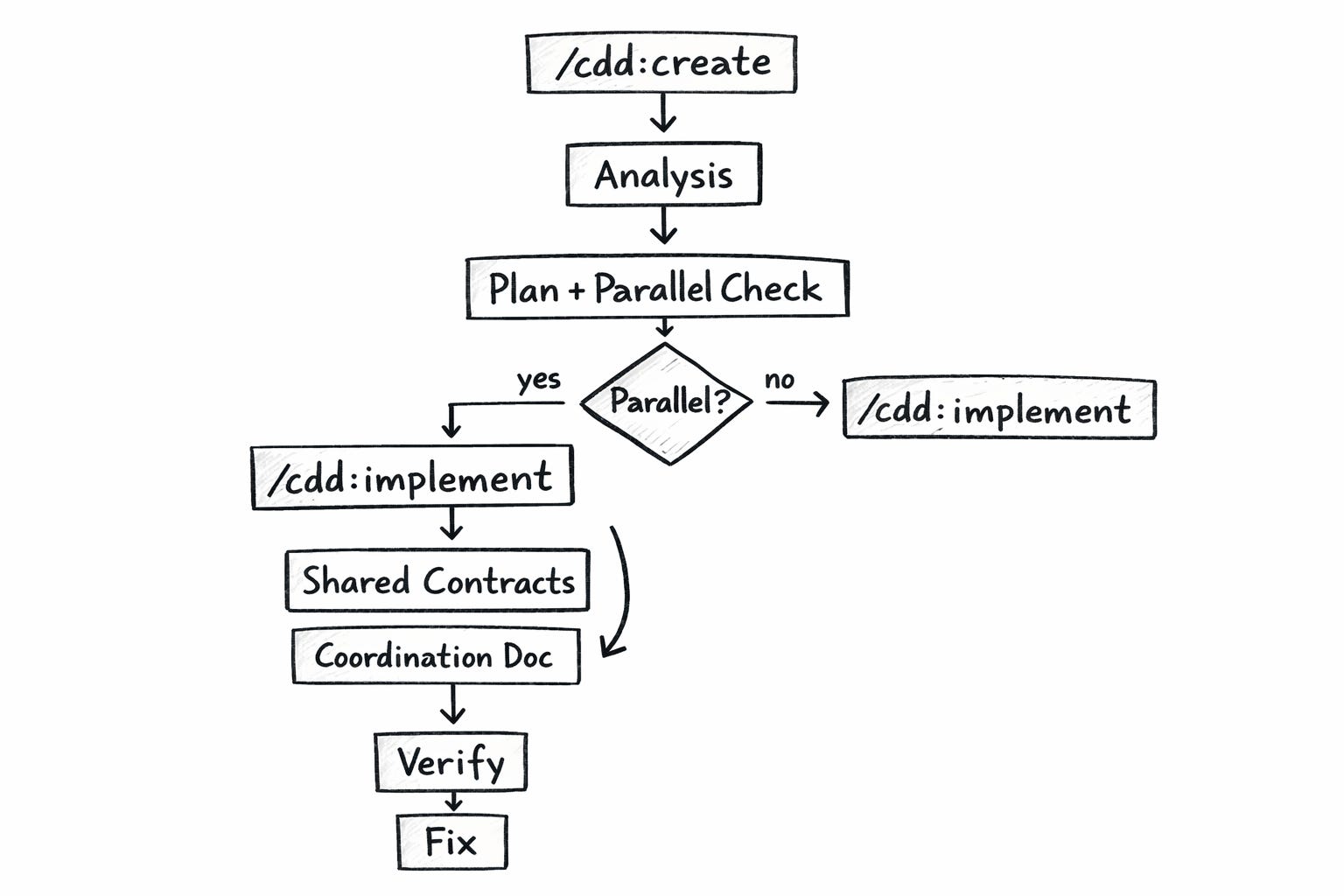
The second idea: a RAG-like context system that optimizes how the AI uses its context window. Instead of stuffing everything into one massive instruction file, you turn it CLAUDE.md into a table of contents — a lightweight index that points to focused context files. The AI reads the index, figures out which files matter for the current task, and loads only those. I think of it as progressive disclosure: the agent gets exactly the knowledge it needs, when it needs it, nothing more.
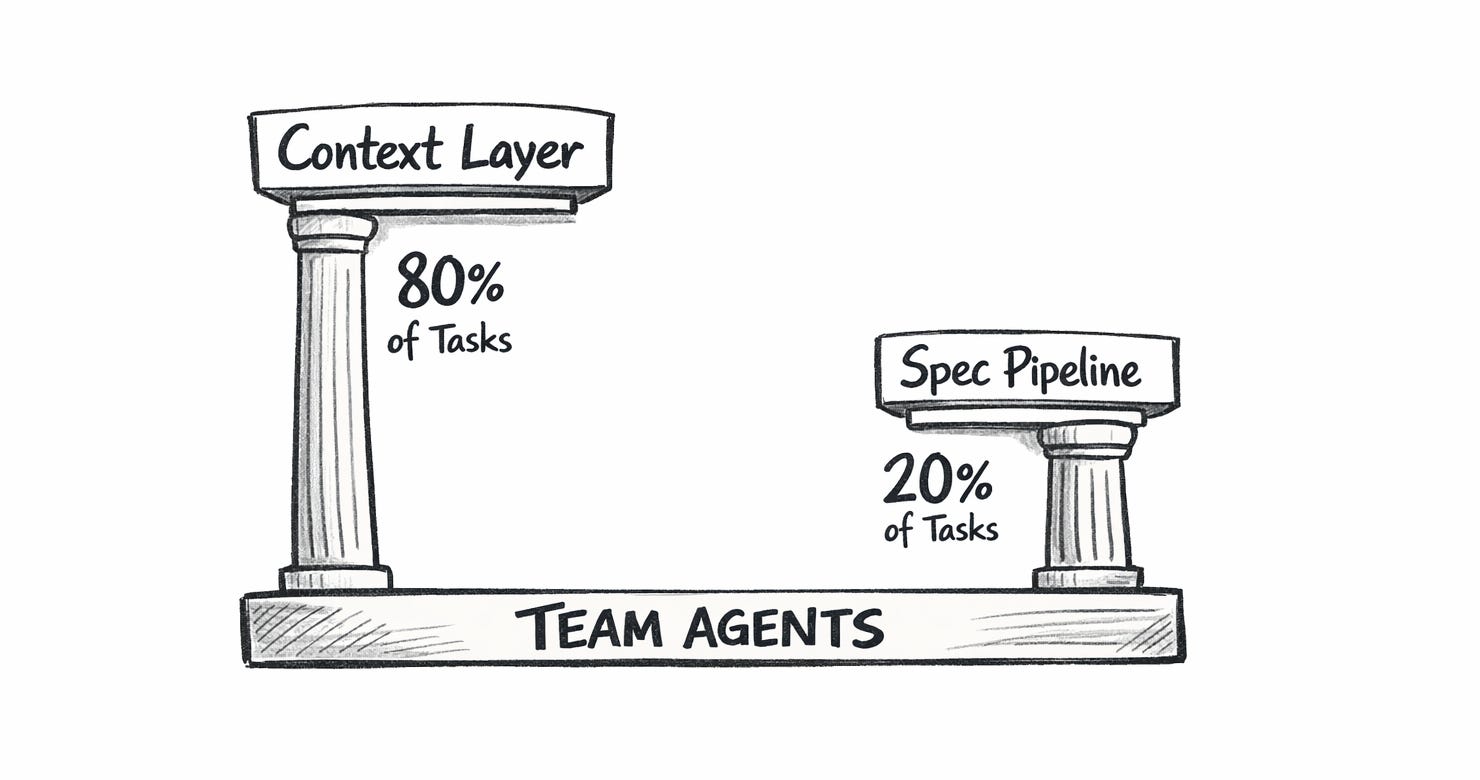
I combined both into a single Claude Code plugin and called it Context-Driven Development — CDD for short. The core philosophy: good context handles 80% of tasks without any planning overhead. Specs handle the other 20% where you genuinely need structure.
Then Claude Code shipped Team Agents — a feature that lets you spawn named AI teammates running in the background, managed by an orchestrator, all working in the same codebase. And something interesting happened. The execution side of my workflow got dramatically simpler. But the context layer — the part I’d built to make agents productive — became more important than ever.
What CDD Actually Does
CDD lives as a Claude Code plugin with a handful of commands. The two that matter most: /cdd:create and /cdd:implement.
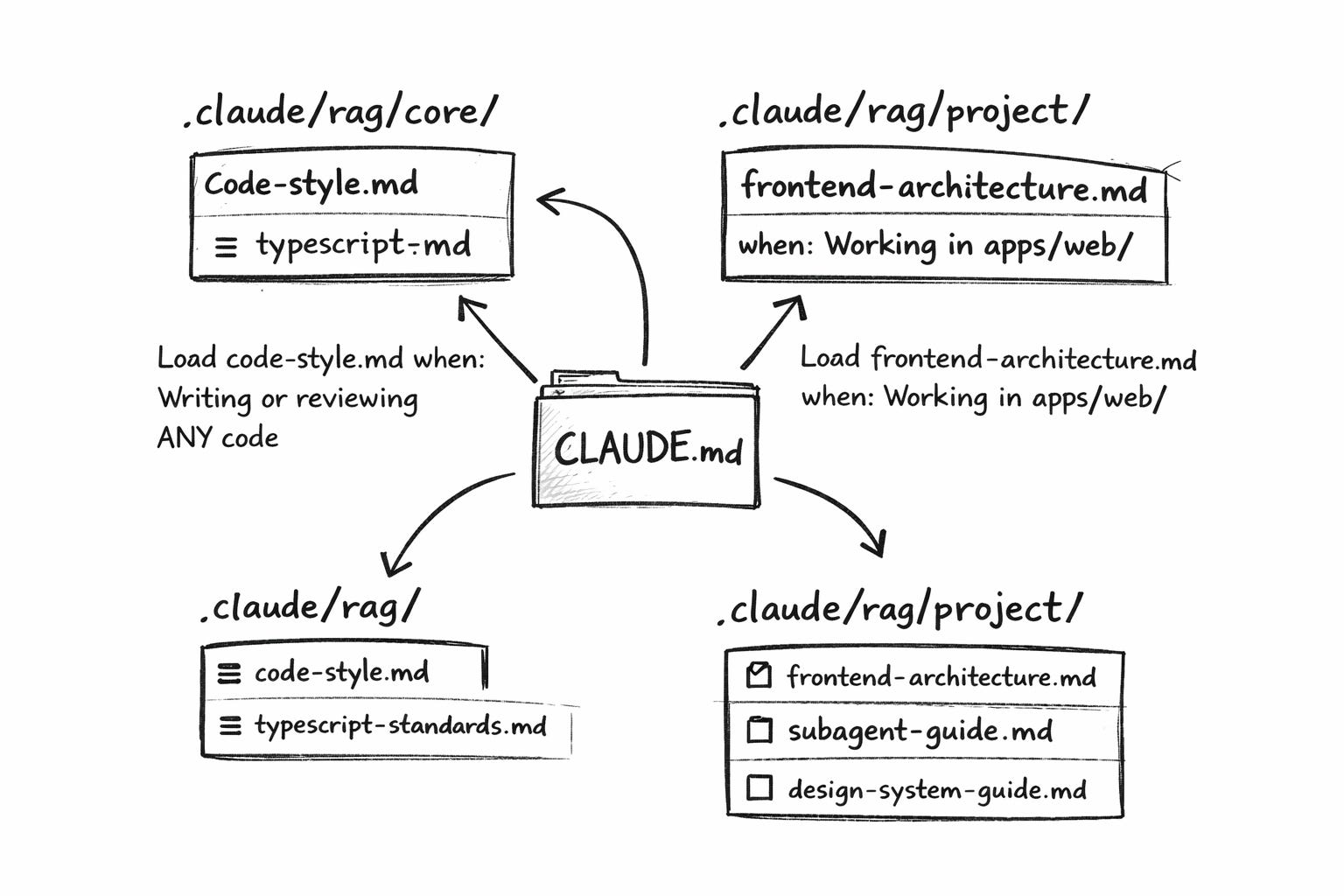
/cdd:create takes a feature description and produces two documents. First, an analysis of your current codebase — what already exists, what’s missing, what constraints apply. Second, an implementation plan with numbered steps. The plan includes something crucial: a parallelization assessment — an analysis of whether parts of the work can be split across multiple agents working simultaneously.
Can parallelize? Yes/No

If Yes:
| Stream    | Steps  | Files           | Dependencies      |
|-----------|--------|-----------------|-------------------|
| ui-layer  | 1-3    | components/     | Shared contracts  |
| api-layer | 4-5    | modules/api/    | Shared contracts  |

Shared Contracts Required:
  interface UserProfile { ... }

Recommendation: Parallel with coordination
The plan doesn’t just list what to build. It figures out whether splitting the work makes sense and identifies the shared agreements (interfaces, types, API shapes) that agents need to settle on before going their separate ways.
/cdd:implement executes the plan. In single-agent mode, it works through steps one by one. With the --parallel flag, it does something more interesting. It reads the parallelization assessment, creates a coordination file with shared TypeScript interfaces, implements those agreements first, then launches all parallel agents in a single API call — each with their assigned scope and a pointer to the coordination file.
No hand-crafted prompts. The plugin handles the spawning. Each agent reads the plan directly. Each agent reads the shared contracts. Each agent knows its boundaries because the plan defines them.
The RAG-Like Layer: Why Context Beats Prompts
The other half of CDD is a lightweight context system inspired by RAG (Retrieval-Augmented Generation). Not RAG in the machine learning sense — there are no vector embeddings or semantic search, but it follows a similar principle. Instead, it’s organized context files with trigger-based loading rules: “load this file when doing that task” instructions. I call it RAG-like because it serves the same purpose — giving the AI relevant knowledge at the right time — just through file triggers instead of neural retrieval.
The structure is flat and discoverable:
.claude/
├── rag/
│   ├── core/                    # Universal standards
│   │   ├── code-style.md
│   │   ├── typescript-standards.md
│   │   └── git-workflow.md
│   └── project/                 # Project-specific patterns
│       ├── frontend-architecture.md
│       ├── backend-architecture.md
│       ├── subagent-guide.md
│       └── design-system-guide.md
The root CLAUDE.md acts as a table of contents with loading triggers:
Load code-style.md when: Writing or reviewing ANY code
Load frontend-architecture.md when: Working in apps/web/
Load subagent-guide.md when: Planning parallel work
Each file stays between 300-800 tokens. Total budget under 5,000 tokens. An agent working on a frontend component loads maybe three files. One is working on a backend endpoint, loading different ones. Nobody loads everything. You avoid bloating the context window while still encoding your team’s full set of best practices.
This replaced the old approach of cramming all context into every interaction. Write the conventions once. Maintain them in the repo. Every agent — whether it’s your main session or a parallel teammate — benefits automatically.
Before Team Agents: How Parallelization Worked
Here’s what the parallel workflow looked like before Team Agents existed.
The plan identified parallel streams. /cdd:implement --parallel created coordination files with contracts. Then it launched agents using Claude Code’s Task tool — generic sub-agents that each got pointed at the coordination file.
It worked. But all the orchestration plumbing fell on you.
The sub-agents could read files just fine. They had full codebase access. The problem wasn’t capability — it was coordination. You had to build the spawning logic, track which agents finished, send shutdown messages, collect results, and handle failures. The orchestrator session spent half its tokens on lifecycle management instead of actual development decisions.
Between sessions, I wrote handoff documents so the next orchestrator could pick up where the last one left off. Without those handoffs, a fresh session wasted twenty minutes rediscovering what was already done.
The methodology was sound. The orchestration plumbing was expensive and fragile.
What Team Agents Changed
Team Agents replaced the execution model while keeping the methodology intact.
The orchestration plumbing disappeared. Spawning named teammates, monitoring progress, shutting down completed agents, and collecting results — Team Agents handles all of it. The orchestrator stops managing the lifecycle and focuses on what actually matters: planning the wave, running verification gates, and fixing the inevitable edge cases.
Prompts got smaller. Not because sub-agents couldn’t read files — they could. But with Team Agents, the coordination model is cleaner. Each teammate gets a focused assignment: read the plan, implement your stream, follow the contracts. The orchestrator doesn’t need to spell out every convention because the teammate naturally picks up context from the codebase during their work. The 800-word prompt dropped to 200 words. Not a capability change — a workflow simplification.
Handoff documents became optional. The repo itself carries the context. An initiative tracker in docs/. Context files in .claude/rag/. The plan and coordination files in .claude/specs/. A new session reads the tracker and picks up immediately.
What didn’t change: the spec pipeline, the parallelization analysis, the contract-first approach, the RAG-like context layer, and the learning loop. The methodology stayed. The plumbing is simplified.
A Side-by-Side Comparison
Before (CDD + Task tool sub-agents):
/cdd:create— analysis + plan with parallel assessment/cdd:implement --parallel— creates coordination.md with contractsImplement shared contracts, commit them
Craft detailed prompts for each sub-agent (embed context, reference contracts, list pitfalls)
Launch sub-agents via Task tool
Monitor progress, collect results manually
Run verification gates
Fix issues
Write a handoff document for the next session
After (CDD + Team Agents):
/cdd:create— analysis + plan with parallel assessment/cdd:implement --parallel— creates coordination.md with contractsImplement shared contracts, commit them
Spawn named teammates, pointing atthe plan + coordination files
Teammates finish and report back
Run verification gates
Fix issues
Steps 4 and 9 vanished. Step 4 simplified from prompt crafting to file referencing. The cognitive load dropped significantly.
In a recent wave, six features shipped in parallel — four frontend pages and two backend services. Over 150 source files. 600+ tests passing. The fix cycle: fifteen minutes. Six issues across six features. Predictable patterns every time.
The Compounding Effect Still Matters
The learning loop is unchanged between the old and new approaches. If anything, it matters more now.
Every wave produces observations about what agents get wrong. Those observations flow into the RAG-like context files — the pitfall table in the subagent guide, the convention notes in the code style doc, the “always check the design system catalog first” rule.
Here’s a concrete example. Wave 1 taught us that date assertions in tests break across timezones. An agent writes new Date('2024-01-01T00:00:00Z') in a test, but in US timezones, that renders as December 31st — and the assertion fails. The fix: always use midday UTC in test dates ('2024-01-15T12:00:00Z'). One line in the pitfall table. Zero agents hit it again after that.
Wave 1: 20+ post-agent fixes needed
Wave 2: ~12 fixes
Wave 3: 6 fixes
That decline comes from richer context files, not smarter models. Each wave deposits knowledge. The next wave’s agents inherit it through the RAG-like layer.
The Honest Part: Cost
Let’s talk about the downside nobody wants to discuss. Parallel agents burn tokens.
Six Team Agents running simultaneously, each with their own context window, each reading architecture guides and spec files, each producing source files and tests. A single wave of six features consumes somewhere between 200,000 and 400,000 tokens. Each teammate uses 30,000-60,000, depending on feature complexity. The orchestrator adds another 20,000-40,000 for planning, verification, and fixes.
On a subscription plan, that’s a meaningful chunk of your daily budget. Two or three full waves before hitting limits. On pay-per-token pricing, it’s real dollars per wave.
Failed experiments compound the cost. An agent that misunderstands a spec wastes its entire allocation. And without guardrails, agents love to verify their own work — hitting a lint error, trying to fix it, introducing a type error, fixing the type, breaking the lint rule again. Ten rounds of tokens for what should be a one-line fix. This is why the no-verification rule matters so much: teammates write code and stop. The orchestrator verifies once, at the end. Batch-fixing six lint issues is radically cheaper than six agents each fighting their own lint loops.
What reduces cost over time:
Better context files. Agents that read good conventions produce correct code faster. Fewer tokens wasted on wrong approaches and rework.
The no-verification rule. This alone cut teammate token usage by roughly 30%.
Smaller prompts. The cleaner coordination model means less repetition in prompts. Focus on what’s unique to each agent — scope and deliverables — not on shared conventions.
The learning loop. Fewer post-agent fixes means fewer orchestrator tokens spent on debugging. The declining fix rate is a cost optimization, too.
The ROI question depends on your situation. For a platform with 35 features and tight timelines, six features in twelve minutes beats six features across six separate sessions over two days. For a small project with relaxed deadlines? Sequential development is cheaper and probably fast enough.
Where CDD Goes Next
Team Agents changed how the plugin’s parallel execution works. Now I’m rethinking the rest of the system to match.
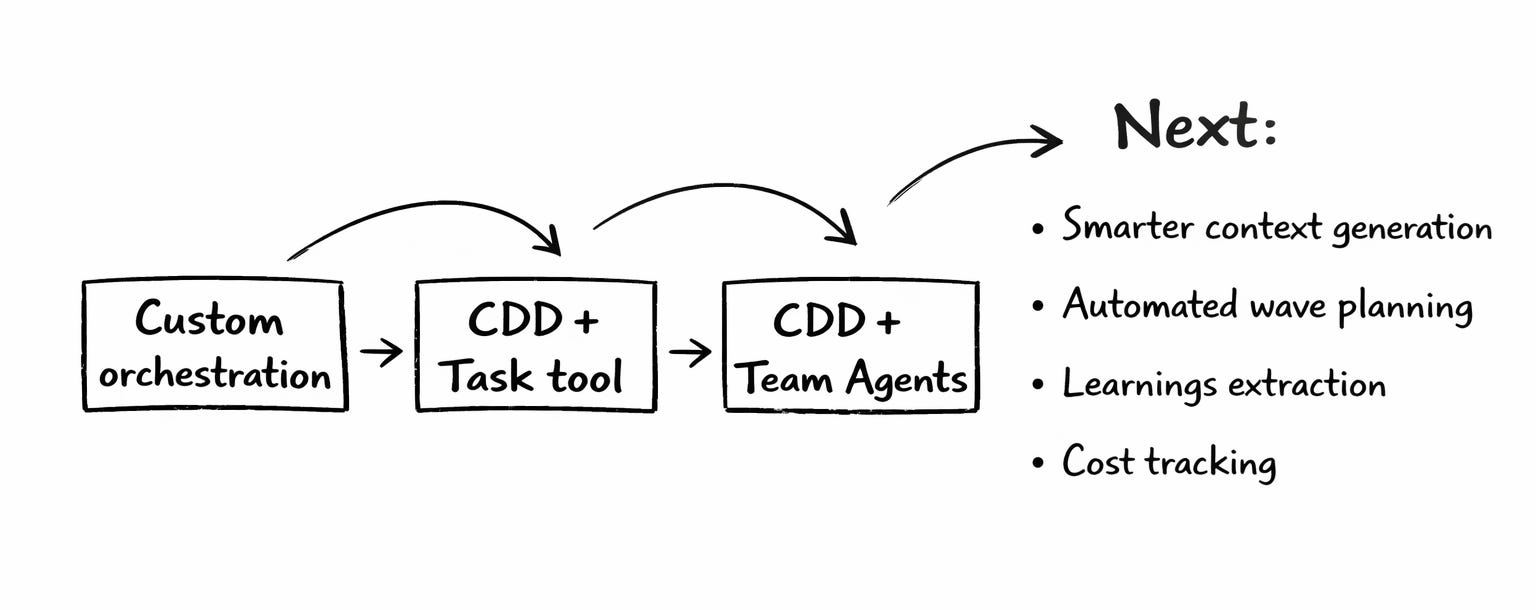
Smarter context generation. Instead of manually writing architecture guides, generate them from the codebase. Scan directory structure, existing patterns, test conventions — produce a context file automatically. Keep it current as the code evolves.
Automated wave planning. The file conflict analysis that determines what can be parallelized is mechanical work. Given an initiative tracker and a directory map, compute safe parallelization. That should be a command, not a manual exercise.
Learnings extraction. After a fix cycle, automatically extract patterns into the pitfall table. “You fixed mock hoisting in three test files” should become a context entry without manual effort.
Cost tracking. Measure tokens per teammate, per feature, per wave. Identify which features cost more and why. Optimize context files and prompt structure based on actual consumption data.
The broader evolution: CDD started as “spec-driven development plus RAG-like context.” Team Agents made the spec execution trivial. Now the leverage is almost entirely in the context layer — the quality of what agents read before they start working. The specs still matter for complex features. But the context files determine whether an agent codes like a stranger or like a teammate who’s been on the project for months.
What I’d Tell You to Try
Start with context, not specs. Set up a .claude/rag/ folder with your architecture patterns and coding conventions. See how far simple prompting gets you with good context. You might be surprised.
Use specs when complexity demands it. Not every task needs a plan. CDD supports adaptive depth — quick mode for small changes, full analysis for multi-directory features. The GitHub repo has the full plugin with setup instructions.
Let the plan analyze parallelization. Don’t decide upfront whether to parallelize. Let the planning step assess it. Sometimes features that look parallel have hidden dependencies. Sometimes, sequential work that looks simple can actually split cleanly.
Commit contracts before launching agents. Shared TypeScript interfaces, agreed-upon API shapes — define them first. Run a type check. Then launch. This single practice prevents the most common parallel execution failures.
Capture learnings religiously. The declining fix rate across waves is the strongest argument for this approach. But only if you actually feed observations back into context files. Every pitfall you document is a pitfall no future agent hits.
Budget for costs honestly. Parallel execution is fast but expensive. Know your token budget. Know when sequential is the better call. The methodology works at any scale — the parallelization is optional, the context layer isn’t.
This describes a real workflow used to build a production platform across multiple waves. 15 full features, 600+ tests, declining fix cycles. CDD is open source — check it out on GitHub. It works with both Task tool sub-agents and Team Agents, but Team Agents made the execution dramatically simpler while making the context layer dramatically more important.
The progressive disclosure approach is the right call. Research just confirmed that front-loading discoverable context actually makes agents perform worse. Your index-to-focused-files pattern avoids this, and I reckon that's why it works. Covered the full study here: https://sulat.com/p/agents-md-hurting-you
This is gold info. I'm already playing with team agents and I'm surprised. Hardware performance is also a important variable of this equation. (be prepared for a Macbook almost flying with the fans on full power when spinning up a big agent team).