
The White-Label Architecture Guide IV
Part 4: The Operations Layer

Before I wrote a single build script, I already knew the hardest part wouldn’t be the builds.
The roadmap made it clear. We weren’t going to manage 10 or 20 white-label apps — we were going to manage hundreds. Each of those apps would need its own signing credentials, store listing, metadata, and developer agreement with Apple. Multiply that by two platforms, and the operational surface area becomes enormous before you ship a single binary.
This is Part 4 of the White-Label Architecture series. If you missed Part 3 — start here.
Parts 2 and 3 covered the CI pipeline and OTA system — the machinery that builds and patches apps at scale. But machinery needs fuel. Every job in that CI matrix quietly assumes a dozen things are true: credentials exist and aren’t expired, the version number won’t collide with what’s already in the store, the assets are current, the metadata matches, and the developer account’s agreements are signed. When any of those assumptions break for one flavor, that build fails. When they break silently across dozens of flavors, you have chaos.
This article is about the layer beneath the pipeline. We packaged it into an internal tool from day zero — not because something broke, but because we could see what would break if we didn’t.
I won’t go into the specifics of Fastlane, EAS, or the Apple and Google APIs themselves — each of those deserves its own deep dive. This article is about the layer above them: the abstraction that coordinates all of those tools so you don’t have to think about them individually across hundreds of apps.
The Operational Surface Area
Here’s what most teams underestimate about white-label at scale: the CI/CD problem is the easy part. The hard part is everything that has to be true before CI can do its job.
Each flavor in the matrix depends on a set of preconditions. Some are obvious — you need credentials to sign a build. Others are subtle. An Apple agreement that expired two weeks ago won’t block your CI trigger. It’ll block the submission step forty minutes later, after you’ve already burned the compute.
At 400+ apps, these preconditions form a surface area that grows linearly with every app you add:
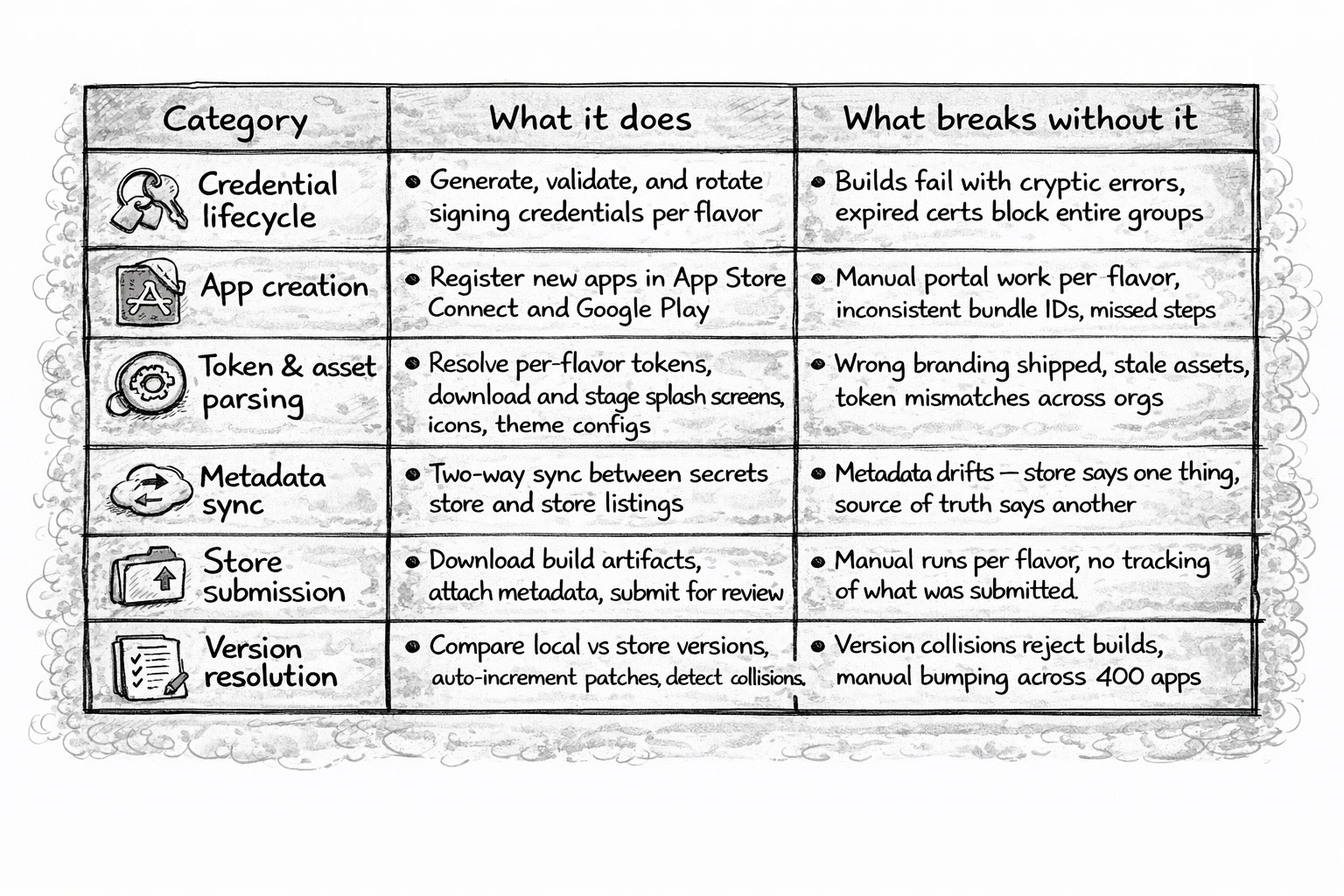
Seven categories. None of them are CI. None of them are config. They’re the operational work that sits between “we want to release” and “the binary is signed and submitted.”
And they’re not independent. A build command needs credentials, version resolution, and asset parsing before it can start. A deploy command needs metadata sync and agreement validation before it can submit. The dependencies between them are what made packaging them together a necessity — not a nice-to-have.
One Package, Many Commands
The architectural decision was straightforward: wrap all of this into a single internal package — a workspace in the monorepo that CI invokes as a CLI. Each command handles one operational concern end-to-end.
Why a package in the monorepo and not scripts scattered across the CI config?
Shared utilities. Every command needs to look up secrets, generate credential files, resolve tokens, report results. That’s a shared foundation. Duplicating it across independent scripts is a maintenance trap — fix a bug in the secrets lookup and you’re patching it in six places.
Consistent interface. Every command follows the same shape: take a company ID, resolve that flavor’s configuration from the secrets store, do the work, report the result. Same contract, different payload.
A clear boundary. The package sits between CI and the outside world. CI calls commands. Commands talk to the App Store Connect API (through Fastlane), the Google Play Developer API, EAS Build and EAS Update (through wrapped CLI calls), and the secrets store. CI never talks to those services directly. Swap CI providers tomorrow — the package doesn’t care who’s calling it.
Here’s the shape of a command:
command: build
  input:  companyId, platform
  steps:  resolve secrets → validate credentials → stage assets →
          resolve version → configure build → trigger build → report
  output: build artifact + status message
command: deploy
  input:  companyId, platform, buildVersion, buildNumber
  steps:  download artifact → generate credentials → sync metadata →
          submit for review → report
  output: submission status
Each command is self-contained — it fetches what it needs, validates before it acts, and reports when it’s done. The build command, for example, wraps eas build — but only after resolving credentials, staging assets, and configuring the eas.json template for that specific flavor. EAS handles the native compilation and code signing. The package handles everything that has to be true before and after that call. The CI pipeline from Part 2 calls these in sequence, but each step is independently reliable.
Here’s where the package sits in the stack:
┌─────────────────────────────────────────────┐
│              CI Pipeline                    │
│  (matrix jobs from Part 2)                  │
└──────────────────┬──────────────────────────┘
                   │ calls
┌──────────────────▼──────────────────────────┐
│          Operations Package                 │
│                                             │
│  ┌──────────┐ ┌──────────┐ ┌─────────────┐  │
│  │credentials││  build   │ │    deploy   │  │
│  └────┬─────┘ └─────┬────┘ └──────┬──────┘  │
│       │             │              │        │
│  ┌────▼─────────────▼──────────────▼──────┐ │
│  │         shared utilities               │ │
│  │  secrets · tokens · assets · logging   │ │
│  └────┬─────────────┬──────────────┬──────┘ │
└───────┼─────────────┼──────────────┼────────┘
        │             │              │
┌───────▼───┐  ┌──────▼────┐  ┌──────▼─────┐
│ App Store │  │    EAS    │  │  Secrets   │
│  Connect  │  │  (Build)  │  │  Manager   │
└───────────┘  └───────────┘  └────────────┘
Middleware. CI above. External services below. Nothing crosses the boundary without going through a command.
Credentials — The Quiet Problem
If I had to pick the single most common silent failure at scale, it’s credentials.
Signing credentials let you talk to Apple’s APIs, sign binaries, and submit builds. At white-label scale, each client has their own developer account — their own Apple team, their own API keys, their own P8 certificates. Hundreds of independent credential sets, each with its own expiration cycle.
When a P8 key expires, the failure isn’t loud. The CI job starts, the build compiles, and forty minutes in — when it tries to submit — the tooling throws a cryptic authentication error. If that key belongs to an organization with 30 apps, all 30 fail the same way. Thirty builds worth of compute, gone.
The package handles the full lifecycle:
┌───────────────┐     ┌──────────────┐     ┌──────────────┐
│    Secrets    │     │  Operations  │     │    Build     │
│    Store      │────▶│   Package    │────▶│   Tooling    │
│               │     │              │     │              │
│  raw P8 key   │     │  normalize   │     │  apple.p8    │
│  key ID       │     │  validate    │     │  api_key.json│
│  issuer ID    │     │  write files │     │              │
└───────────────┘     └──────────────┘     └──────────────┘
Fetch the raw key material from the secrets store. Normalize it — different sources store P8 content in different formats: escaped newlines, single-line blobs, PEM. Write the two files the build tooling expects: a .p8 for signing and a JSON wrapper with the key ID and issuer ID for API calls.
The validation step is what saves you. Before the build starts, the package makes a test API call with the generated credentials. If it fails, the build stops immediately. No wasted compute. Clear error. Clear remediation.
This extends to push notification credentials too. Each flavor needs its own push key. Same pattern: fetch, generate, stage. One command covers the entire credential surface for a flavor.
Metadata and Agreements
Two related problems that compound at scale.
The Drift Problem
Each app has a live store listing — description, keywords, subtitle, promotional text, URLs. The source of truth lives in our secrets store, not in App Store Connect. But the real world doesn’t always respect your source of truth.
A client contacts support to change their description. Someone edits keywords directly in the portal. A privacy URL changes. Now the secrets store and the live listing disagree, and the next deploy overwrites whichever version is wrong.
The sync strategy is two-way, with the secrets store as the authority:
┌────────────────┐                    ┌──────────────────┐
│  Secrets Store │                    │  App Store       │
│  (authority)   │                    │  Connect         │
│                │                    │                  │
│  description   │────── push ─────▶  │  description     │
│  keywords      │                    │  keywords        │
│  subtitle      │◀── pull/backfill───│  subtitle        │
│  URLs          │   (if empty)       │  URLs            │
│                │                    │                  │
│  Static values │───── always ────▶  │  support URL     │
│  (not stored)  │     written        │  review contact  │
└────────────────┘                    └──────────────────┘
If the secrets store has a value, push it. If a field is empty, pull from the live listing and backfill. Static values — support URL, review contact info, review notes — are hardcoded constants in the package itself. They don’t vary per flavor, so there’s no reason to store them remotely. They’re written on every deploy automatically.
No human decides whether to sync. The package handles the direction based on what’s populated and what isn’t.
The Agreement Problem
Apple periodically requires developers to accept updated agreements. Until they do, no submissions go through. The portal just quietly refuses.
Here’s what makes this painful at our scale: each client publishes under their own developer account. One per app, both platforms. Hundreds of independent accounts, each with its own agreement status. When Apple pushes a new agreement, it doesn’t expire everywhere at once — it depends on when each account last accepted terms.
An expired agreement doesn’t surface as “agreement expired” in CI. It shows up as a vague submission failure, forty minutes into a build. Multiply that by however many accounts are lapsed, and a release wave burns compute on builds that were never going to succeed.
A single audit command fixes this. Query every developer account, check agreement and credential status, and report which ones are blocked. Run it before a release wave — not during. Catching a lapsed agreement beforehand means you can notify the client or skip that flavor. Catching it mid-pipeline means the build is already wasted.
Version Resolution
Part 3 introduced the comodín — the patch number as a retry counter. Bump the patch, fix the issue, resubmit. The app is functionally the same.
At 400 apps, you can’t manually track which version is live for each flavor. Some are on 3.2.0. Others got rejected and resubmitted as 3.2.1 or 3.2.2. A few might still be on 3.1.x because an agreement lapse blocked them during the last release. The version landscape is never uniform.
The package resolves this automatically before every build. Query the store for the flavor’s current version — including pending and rejected builds, not just the live one — compare against the local version, and apply the rules:
Local: 3.2.0    Store: —        →  Use 3.2.0 (first release)
Local: 3.2.0    Store: 3.2.1    →  Use 3.2.2 (auto-increment patch)
Local: 3.3.0    Store: 3.2.4    →  Use 3.3.0 (new release)
Local: 3.1.0    Store: 3.2.0    →  Warn (possible downgrade)
The second case is the comodín working at the infrastructure level. The store has 3.2.1 — maybe from a previous rejection. The local version says 3.2.0 because package.json it tracks the release, not the retry count. The package resolves to 3.2.2 and writes it directly into package.json before the build step runs. No environment variable tricks — the file itself is mutated in the CI workspace, and EAS reads the updated version at build time.
Why query all states? Because a collision with a rejected build still blocks submission. Apple won’t accept 3.2.1 if a rejected 3.2.1 already exists. The package sees it and increments past it.
At 400 apps, even a 2% collision rate means 8 wasted builds per release. Over a year of biweekly releases, that’s 200+ wasted builds — compute, CI resources, and someone’s attention each time.
What This Layer Doesn’t Solve
The package handles single-flavor operations reliably. Give it a company ID and a command, and it handles secrets, credentials, metadata, versions, and reporting. One app at a time, it’s solid.
But it has no opinion about the fleet.
Sequencing — which flavors build first? Prioritize failures from last time? Skip expired agreements? The package doesn’t know.
Concurrency — how many builds run in parallel? Rate limiting against Apple’s APIs and CI resource pools? Not its job.
State — is the release done? 80% done with 12 failures? The package has no concept of a release. It operates on one flavor at a time.
Recovery — a build failed. Transient network error or expired credential? The package reports the failure. Deciding what to do next is someone else’s problem.
These are orchestration problems — the domain of a Release Manager, not an operations package. The package gives you the hands. The brain is a different system. And that separation is deliberate. Well-shaped, reliable commands can be composed by anything — a Release Manager, a dashboard, or a different CI system. The package doesn’t need to know who’s calling it.
From Scripts to Infrastructure
The operations layer is the least glamorous part of the stack. There’s no conference talk about credential rotation. Nobody demos metadata sync. But without it, the CI pipeline from Part 2 and the OTA system from Part 3 are built on sand.
Think about what happens without it. A new engineer joins the team and needs to ship a hotfix across 400 apps. Without the package, they need tribal knowledge — which flags to pass, where the keys live, how to check agreements, how to avoid version collisions, which metadata fields to sync, and in which direction. That knowledge lives in someone’s head. It leaves when they do.
With the package, they run a command. The command knows.
This was a day-zero decision. Not because something had already broken, but because the roadmap made the volume obvious. You either build the abstraction before the flood, or you spend the next two years writing the same script six different ways across a dozen CI configs.
The package gives you reliable operations for a single app. The config from Part 1 tells it how each app looks. The CI matrix from Part 2 runs it in parallel. The OTA system from Part 3 patches without rebuilding. Together, they form the infrastructure backbone of a white-label system.
But infrastructure only gets you so far. At some point, different apps need different capabilities — not just different branding, but different features. And that raises a harder question: how do you let a single codebase diverge in behavior without actually splitting the code apart?
Next in the series: Part 5 — Tailored Features.